
Guide for Windows users moving to Mac
NetLimiter Alternative for Mac: What Throttlr Can and Can't Do
NetLimiter is currently built for Windows rather than macOS. For Mac users who want its core per-app workflow, Throttlr provides live upload and download monitoring, separate bandwidth caps, data quotas, and temporary directional blocks. It is not a one-to-one replacement: NetLimiter also includes connection filters, priorities, general rule scheduling, long-term statistics, and remote administration that Throttlr does not reproduce.
Published
Is there a NetLimiter alternative for macOS?
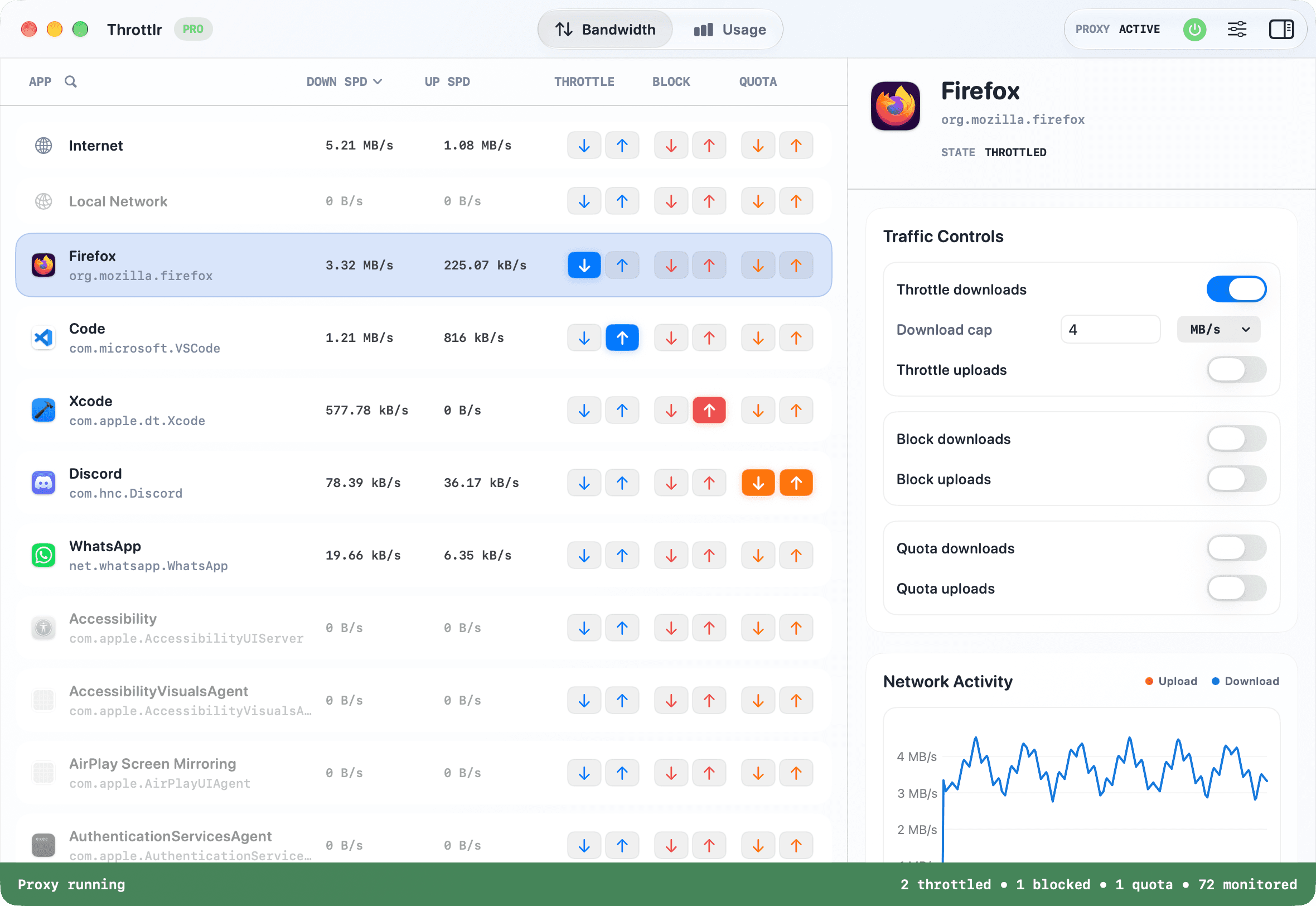
NetLimiter's official download supports Windows, not macOS. If the part you rely on is seeing which application is moving data, setting a maximum upload or download speed for it, enforcing a data quota, or temporarily stopping its traffic, Throttlr provides that core workflow on a Mac.
Throttlr is not NetLimiter for Mac and is not a port of the Windows product. The two applications use different operating-system networking frameworks and have different feature scopes. NetLimiter is a broader rule, filtering, statistics, and administration product; Throttlr focuses on understandable per-app monitoring, bandwidth caps, data quotas, and blocking through Apple's Network Extension framework.
That narrower scope may fit someone who wants direct controls without building detailed connection filters. It will not fit someone whose workflow depends on priorities, general scheduled rules, domain or IP rules, historical connection logs, or remote management. The comparison below makes those boundaries explicit.
Why I built Throttlr
I built Throttlr after looking for a macOS alternative to the NetLimiter workflow I knew from Windows. I wanted to open one native Mac app, see which processes were using the connection, and put separate upload or download limits on the application causing the problem. I also wanted a quick block when a transfer needed to stop completely.
That origin defines what Throttlr prioritizes: a live list of applications and background services, separate directional controls, and broader Internet and Local Network targets. It does not mean every NetLimiter feature belongs in Throttlr, or that the products should be presented as equivalent.
Future Throttlr updates
Throttlr is actively developed, and additional capabilities are planned for future releases. The aim is to expand what the app can do on macOS while keeping its per-app traffic controls clear and practical.
An active Monthly or Yearly Pro subscription includes updates released during the subscription period. A Lifetime Pro purchase includes, at no additional license charge, updates released generally for the same Throttlr product. Specific features and release dates are not guaranteed, and separately branded successor products or separately priced add-ons are not automatically included.
NetLimiter and Throttlr feature comparison
Both products can monitor application traffic, apply per-app bandwidth limits and data quotas, and block traffic. NetLimiter extends much further into connection-level rules, automation, statistics, and Windows administration, while Throttlr concentrates on the smaller set of controls available in its macOS workflow.
| Capability | NetLimiter | Throttlr |
|---|---|---|
| Operating system | Windows 7, 10, 11, and later, according to its current download page | macOS 15 or newer |
| Live application traffic | Per-application and per-connection monitoring with a real-time chart | Live upload and download rates for apps, services, and traffic scopes |
| Bandwidth limits | Limits for a machine, app, user, filter, or individual connection | Separate upload and download caps for an app, service, or broader scope |
| Traffic blocking | Connection Blocker rules with configurable conditions | Temporary upload, download, or two-direction blocks for a selected target |
| Domain, IP, and connection filters | Yes | No; Throttlr is not a destination-level rule engine |
| Traffic priorities | Yes | No; use explicit bandwidth caps |
| Schedules and quotas | Yes | Data quotas with daily, weekly, or monthly resets; no general scheduled rules |
| Long-term statistics and connection history | Yes | Live and runtime monitoring, without a NetLimiter-style long-term statistics database |
| Remote administration | Yes | No; controls are local to the Mac |
| Internet and local-network aggregates | Custom filters can describe many network entities | Dedicated Internet and Local Network targets alongside app rows |
NetLimiter details reflect its official documentation as reviewed on August 12, 2026. Throttlr capabilities were updated on August 30, 2026. NetLimiter is a product of Locktime Software s.r.o. Throttlr is independent and is not affiliated with, endorsed by, or an official macOS version of NetLimiter or Locktime Software.
The familiar parts of the workflow
The closest conceptual match is the application list. Start the target app, generate network activity, and identify it by its current upload or download rate. In Throttlr, a helper executable may be grouped with its parent application, while an independently signed background service can appear as its own row.
Select the row and set a download cap, an upload cap, or both. The controls are explicit maximum rates rather than relative priority levels. If the transfer must stop, enable the corresponding blocking directions and remove them when access should return.
Throttlr also shows Internet and Local Network as aggregate targets. These are useful for system-wide shaping or testing, but they are broader than an application rule. Select the app row when the goal is to control one program without restricting every other application on the Mac.
Important differences before switching
- NetLimiter can filter and control individual connections using application paths, domains, IP ranges, users, and other conditions. Throttlr controls apps and traffic scopes, not individual destinations or ports.
- NetLimiter priorities redistribute bandwidth according to relative importance. Throttlr does not implement a priority engine; you enter concrete upload and download caps instead.
- NetLimiter supports scheduled rules and data-transfer quotas. Throttlr supports per-app and system data quotas with daily, weekly, or monthly resets, but it does not provide general calendar-based rule scheduling.
- NetLimiter records long-term statistics, connection history, and logs. Throttlr is designed around live and runtime traffic visibility rather than a comparable historical database.
- NetLimiter supports remote administration and user permissions on Windows machines. Throttlr is a local Mac application and does not provide central remote management.
- Connections opened before Throttlr's current proxy provider started may remain outside it because of an Apple Network Extension limitation. Starting the proxy first, or quitting and reopening the target app, provides more reliable coverage.
Recreate a basic NetLimiter workflow on Mac
- Install Throttlr, start its proxy, and approve the Network Extension when macOS asks.
- Open the application you want to control and create some network activity so its row becomes easy to identify.
- Select the app or background service and watch its live upload and download rates.
- Enable throttling for the relevant direction and enter a maximum rate. Use both caps when the workflow needs symmetric control.
- For usage-based control, set a data quota, choose whether downloads, uploads, or both count, and select a daily, weekly, or monthly reset.
- Watch the target app and the work you are trying to protect, then adjust the cap until both behave acceptably.
- Use download or upload blocking when the traffic needs a hard stop rather than slower progress.
- Quit and reopen the target app if older connections continue outside the current provider, and enable Launch at Login for more consistent routine coverage.
When Throttlr is the right alternative (and when it is not)
Throttlr is a reasonable fit when you moved from Windows to Mac and primarily miss live per-app rates, separate upload and download limits, usage quotas, and a fast way to stop one application's traffic. It is also useful when you want to constrain one test target without slowing every development or communication tool on the machine.
Choose a detailed application firewall when your main requirement is deciding which domains, servers, ports, or connections an app may use. Choose a broader network-conditioning tool when you need latency, packet loss, or other adverse-network properties. Keep NetLimiter on Windows when your workflow depends on general rule scheduling, priorities, historical analysis, or remote administration.
The most accurate description is therefore a NetLimiter-inspired macOS workflow, not a complete NetLimiter replacement. Throttlr deliberately covers the per-app bandwidth-control problem that led to its creation while documenting the capabilities it leaves out.
NetLimiter alternative questions
Does NetLimiter run on macOS?
NetLimiter's official download currently lists Windows operating systems and does not provide a macOS build. Throttlr is a separate, independent app built for macOS.
Is Throttlr a complete replacement for NetLimiter?
No. It covers live per-app monitoring, directional bandwidth caps, data quotas, and blocking, but it does not reproduce NetLimiter's connection filters, priorities, general scheduled rules, long-term statistics, or remote administration.
Can I import NetLimiter rules into Throttlr?
No. The products use different rule models and operating-system networking frameworks. Recreate the required app-level caps or blocks manually and verify them against fresh connections.
Can Throttlr limit one Mac app without slowing everything else?
Yes. Apply upload or download caps to the identified app or service row. Other applications remain unrestricted unless they share that process or you also control an aggregate Internet or Local Network target.
Need help with setup, existing connections, or licensing? Read the Throttlr FAQ.
Related guides
Mac users
Set a data quota per app
Set a download, upload, or combined data quota for one Mac app, then block or slow its traffic when the allowance is reached.
Mac users
Limit bandwidth per app
Learn how to limit download and upload bandwidth for an individual app on macOS without slowing every other app.
Mac users
Block an app's internet access
Temporarily block download and upload traffic for one macOS app while keeping other apps and local-network traffic available.