
Product update
Per-app data quotas in Throttlr 1.3.0
Throttlr can now track data use for each app and block or slow its traffic when an allowance is reached.
By Throttlr ·
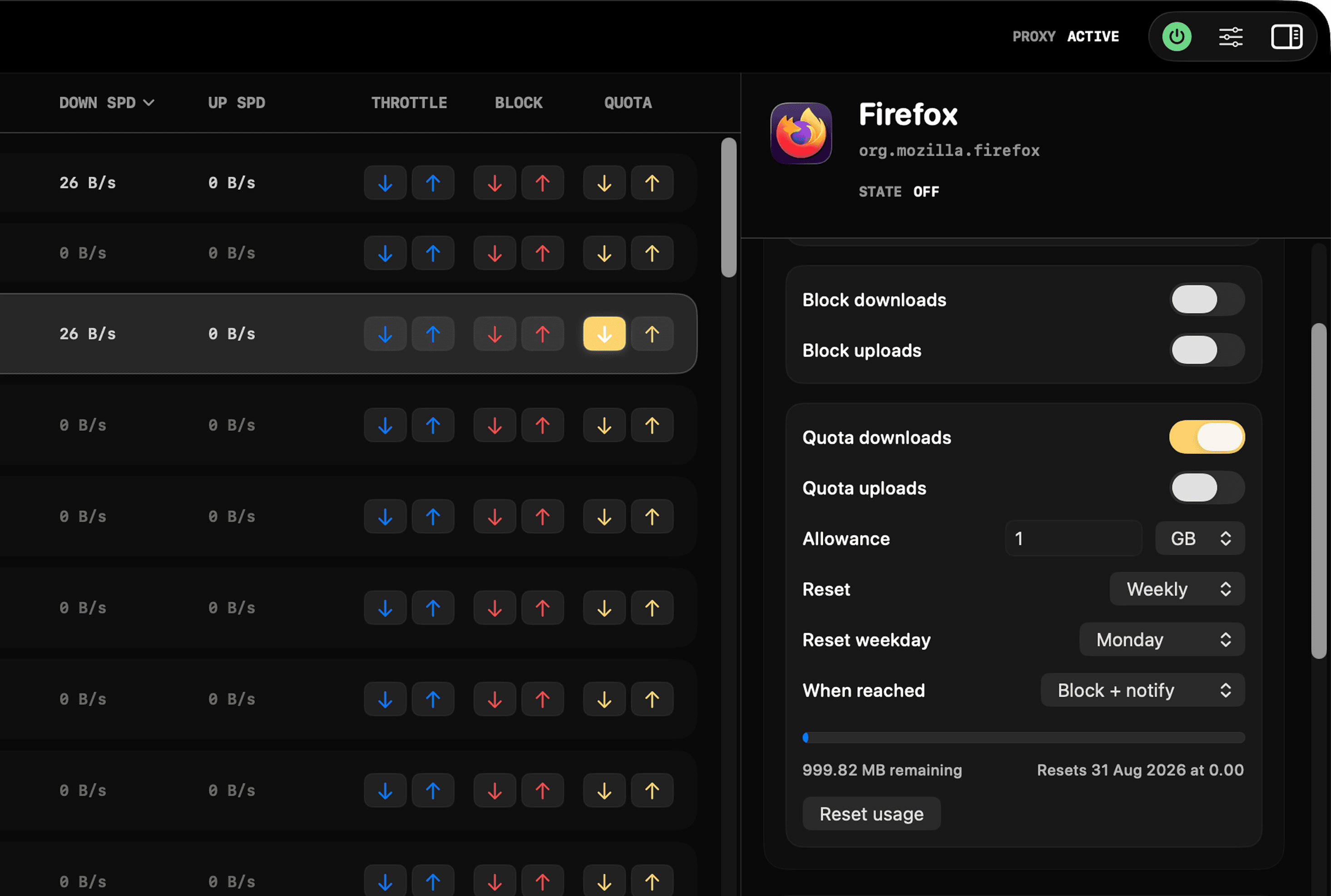
Throttlr 1.3.0 adds per-app data quotas. Set an allowance, choose which traffic counts toward it, and decide what Throttlr should do when the limit is reached.
For setup steps and practical examples, read How to Set a Data Usage Limit for Any Mac App.
Choose what counts
A quota can count downloads, uploads, or both for an individual app. The dashboard shows how much data remains and when the next automatic reset will happen. You can also reset usage manually at any time.
Block or slow traffic at the limit
When an app reaches its quota, Throttlr can block its counted traffic or switch it to a lower speed. Download and upload caps can be set separately when you choose throttling. Throttlr sends a notification when the quota is reached, and the action stays active until usage resets.
Set a reset schedule
Quotas can reset daily, weekly, or monthly. Choose a weekday for weekly resets or a day of the month for monthly resets. You can also leave automatic resets off for an allowance that only resets manually.
Availability
Per-app data quotas are included with Throttlr Pro in both the direct-download and Mac App Store editions. Throttlr 1.3.0 requires macOS 15 or newer.